
USER GUIDE FOR SCIWIL EN06-LCD DISPLAY
📋 CONTENTS
🖥️ HOW TO USE THE SCIWIL EN06 MONITOR
Smart electronic bike display – Easy to use, with many features
Model: EN06
Protocol: Lithium II
Version: V6.02

Congratulations on purchasing a smart display for your electric bike. Please read the instructions carefully before use.
⚡ DO NOT REMOVE/REDUCE THE SCREEN WHEN THE POWER IS ON
Always turn off the vehicle's power before connecting or disconnecting the monitor to avoid damaging the device.
🛡️ DO NOT HIT OR DROP ON THE SCREEN
The screen uses toughened acrylic glass, which prevents strong impacts to avoid breaking the surface.
🌧️ AVOID HEAVY RAIN AND DIRECT SUNLIGHT
Do not tear the waterproof layer on the surface of the screen – this will reduce its water resistance.
🔧 DO NOT REMEDY THE INSTALLATION BY YOURSELF
Unauthorized adjustments can cause instability in operation. If the screen is defective, please send it to the repair center.
Fix the monitor to the steering wheel, adjust the viewing angle accordingly. Ensure the vehicle is completely turn off the power, Then plug the monitor cable into the controller to complete the assembly.
Material
Case: ABS
Screen: High-grade acrylic (equivalent to toughened glass)
Temperature
Working: -20°C ~ 60°C
Durability: Resistant to harsh weather conditions

Supported voltage
DC 24V – 60V (can be installed directly on the screen). Support for customizing other voltage levels.

⚠️ Some products use waterproof connectors – the color of the wire cannot be determined from the outside.
5.1 Displayed information
5.2 Display area
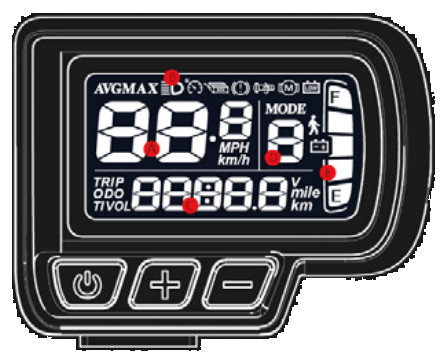
5.3 Keyboard
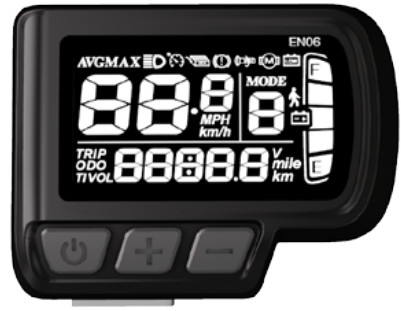
Power button
Press and hold to turn the screen on/off.
Quickly press to transfer information in the flexible area.
In Settings: go to the next item.
Plus (+) key
While driving: increase the PAS assist level.
Press and hold for 3 seconds: turn on/off the headlights.
In Settings: increase the value of the parameter.
Minus (-) key
While driving: reduce the PAS assist level.
When the vehicle stops + stays: enter the 6 km/h walking mode.
While driving + holding: turn on/off the Cruise mode.
In Settings: reduce the parameter value.


5.4 The installation items (P01–P16)
| Code | Functions | Value/Description |
|---|---|---|
| P01 | Screen brightness | 1st (best) – 3rd (worst) |
| P02 | Unit of measurement | 0: kilometers | 1: miles (miles) |
| P03 | Battery voltage | 24V/36V/48V/60V/72V |
| P04 | Automatic power off | 0 = not turned off; other value = number of minutes |
| P05 | PAS support level | 0/3 mode: Gears 1–3; 1/5 mode: Gears 1–5 |
| P06 | Wheel size | Inch unit, accuracy 0.1 |
| P07 | Number of motor magnets | Range: 1–100 |
| P08 | Speed limit | 0–50 km/h (default: 50 km/h) |
| P09 | Starting up | 0: Live | 1: Kick-to-Start (kick one round) |
| P10 | Operating mode | 0: PAS | 1: Run the brake | 2: Combine PAS + Brake |
| P11 | PAS sensitivity | Range: 1–24 |
| P12 | PAS start intensity | Range: 0–5 |
| P13 | Number of PAS sensor magnets | 5 / 8 / 12 pieces |
| P14 | Current limit | Default value: 12A; Range: 1–20A |
| P15 | – | Not determined |
| P16 | Delete ODO | Press and hold the (+) key for 5 seconds to clear the total distance |
| Error code | Contents | Notes |
|---|---|---|
| E00 | ✅ Normal | – |
| E01 | 🔒 Locked/Enabled safe mode | – |
| E02 | ⚠️ Brake failure | – |
| E03 | ⚠️ Pedal sensor (PAS) error | No signal |
| E04 | 🚶 Walking support mode at 6 km/h | – |
| E05 | 🚗 Auto-drive mode (Cruise) | – |
| E06 | 🔋 Low battery | – |
| E07 | ❌ Engine fault | – |
| E08 | ❌ Scooter fault | – |
| E09 | ❌ Controller (IC) error | – |
| E010 | ⚠️ Connection signal reception error | – |
| E011 | ⚠️ Connection signal error | – |
| E012 | ⚠️ BMS communication error | – |
| E013 | ⚠️ Headlight malfunction | – |
Product serial number
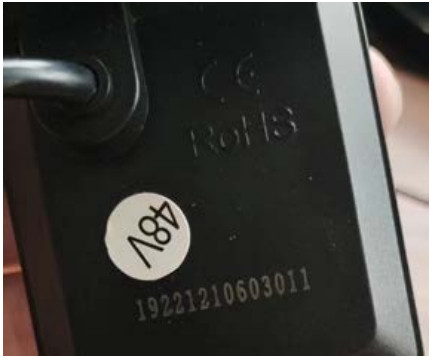
| Symbol | Meaning |
|---|---|
| 192 | Customer code |
| 2 | Protocol code |
| 1 | The program can overwrite (0 = not possible) |
| 210603011 | PO – Quantity of orders |
✅ Warranty period: 24 months
From the date of manufacture (by serial number). The warranty is not transferable to third parties other than those specified by Sciwil.
❌ Cases NOT covered by warranty:
- The product has been modified or repaired without permission
- Use for rental, commercial or racing purposes
- Damage caused by accident, negligence, improper assembly/repair, or abnormal wear and tear
- Damaged during transportation due to the buyer's improper storage
- Surface damage after shipping (case, screen, buttons)
- Damaged wiring/cable system after shipment (broken, scratched externally)
- The error is due to incorrect configuration or unauthorized parameter changes
- Damage caused by force majeure
- The product has expired warranty period
 Tiếng Việt
 日本語
 English
 नेपाली
 ဗမာစာ